

Service accounts
A service account is an identity of one workspace for a script or a CI job. It has a role, acts as itself and appears in the audit log under its own name. It keeps working when the person who set it up leaves. It signs in with a secret, or with a token that an outside service such as GitHub Actions issues, and gets an access token for one hour. A service account is not the account at another system that the connect dialog under Connectors recommends.
Who can do this: admins of the workspace with debug mode. Debug mode is operator tooling that a platform admin turns on for their own account, so customers do not see this section.
Create a service account
- Open Settings, then Members, and scroll to Service accounts.
- Enter a name, such as "Nightly export", choose Member or Admin and select Create.
- The account shows with its Client ID. It cannot sign in until you add a secret or a rule.
Add a secret
- Next to the service account, select Add secret.
- Choose how long it is valid under Valid for: 30, 90, 180 or 365 days. Select Create secret.
- Copy the secret now. It is shown once.
- Before it expires, select Replace. The old secret keeps working until it expires.
Add a rule for an outside service
-
Next to the service account, select Add rule.
-
Enter the Issuer, the Audience and the Subject that the service's token carries. Use the GitHub Actions example fills in the values for GitHub Actions.
-
Name the repository and the branch in Subject.
*stands for any run of characters, and a subject that is only*accepts every job of that issuer. -
Select Add rule. No secret is stored.
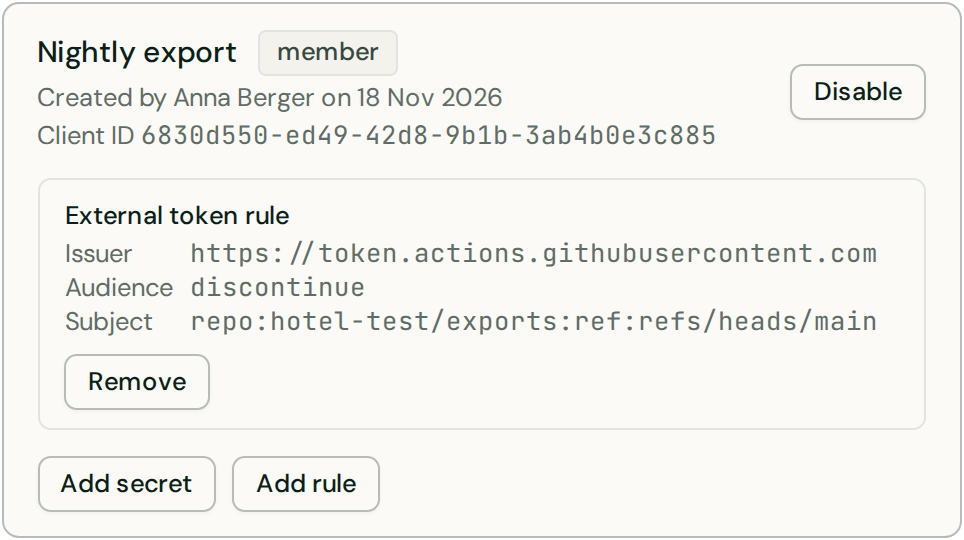
A service account with a rule for GitHub Actions.
Get an access token
-
Send the client ID and the secret, or the client ID and the outside token, to
POST https://discontinue.dev/api/v1/auth/machine/token:curl https://discontinue.dev/api/v1/auth/machine/token \ -H "Content-Type: application/json" \ -d '{"grantType": "client_secret", "clientId": "<client id>", "clientSecret": "dsas_..."}' -
The answer holds an access token for one hour. Renew it with
"grantType": "renew"for up to 24 hours. After that, sign in with the secret or the rule again.
Good to know
- No part of the Discontinue API accepts a service account's token yet. Calls with it are refused.
- Adding or replacing a secret or a rule, and deleting or enabling the account, asks you to confirm it's you when your last sign-in is older than 10 minutes.
- Delete removes the account for good, with its secrets, rules and tokens. Scripts that used them stop working. This cannot be undone.
- Disable stops every token of the account at its next request. Enable lets it sign in again.
- Five wrong secrets within a minute block the secret for five minutes.
- Admins are emailed 14 and 3 days before a secret expires.