
See and end your sessions
Who can do this: everyone with an account.
A session is one browser that is signed in to your account. Sign out any you don't recognise.
Steps
-
Select your name at the bottom of the sidebar. Account opens. Select Security.
-
Under Sessions, each row shows the browser and system, its network address and when it was last active. This device marks the browser you are using.
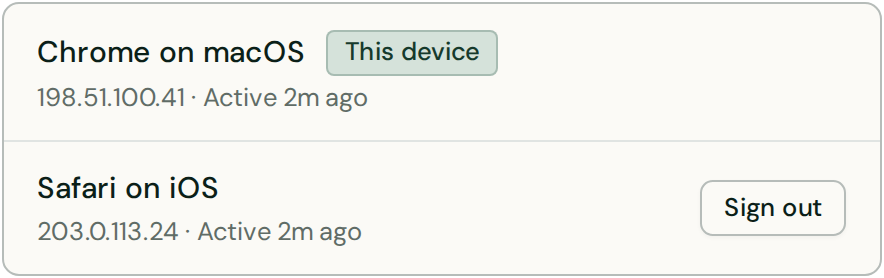
Two sessions, the one you are using first. -
Select Sign out next to a session to end it. "Session signed out." appears.
-
To end every session but this one, select Sign out of all other sessions.
-
A browser that was signed out goes to the sign-in page at its next step.
Good to know
- Changing or resetting your password, removing it or turning off two-factor authentication also signs out your other sessions.
- An admin of your organization can sign you out everywhere.
- Signing out a session does not revoke your API tokens or disconnect your AI assistants. See API tokens.
If something goes wrong
- "Unknown device" or "Unknown address": the browser did not say what it is, or the session is older than these details.
- A session you don't recognise: sign it out, then change your password.
The rules behind this task are in the reference, under Sessions.