

Verify a domain
Who can do this: admins of the organization. You need access to the domain's DNS settings.
A verified domain tells Discontinue that the accounts with an address on it belong to your company.
Steps
-
Open discontinue.dev/org, select your organization and open Domains.
-
Under Domain, enter the domain, such as
hotel-group.com, and select Claim domain. -
Under Publish this DNS record, copy the TXT name and the TXT value.
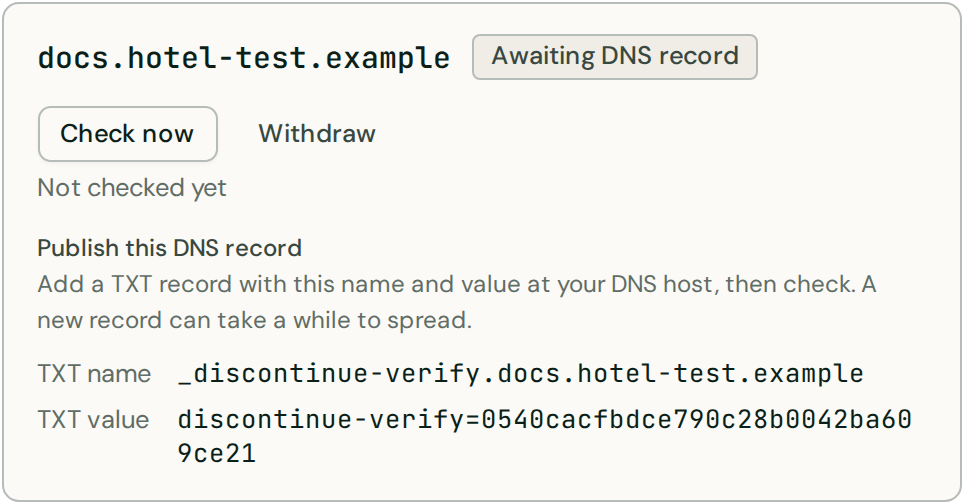
A claimed domain and the DNS record that proves it. -
At your DNS host, add a TXT record with that name and value.
-
Back on Domains, select Check now. A new record can take a while to spread, so check again later if "The record was not found yet." appears.
-
"Domain verified." appears, and the badge changes to Verified.
Good to know
- Every account with an address on the domain becomes a managed account of your organization. Each person is told by email.
- A claim covers the exact domain. Claim a subdomain, such as
mail.hotel-group.com, separately. - Discontinue checks the record every day. If it disappears, your admins are warned, and the domain stays yours.
- When the domain belongs to another organization, your record starts a transfer of 7 days. The other organization is warned and keeps the domain until then.
If something goes wrong
- "That is a public mail domain. Nobody can claim it.": domains such as gmail.com cannot be claimed.
- "Too many checks. Try again later.": wait up to an hour.
- "Another organization is already taking this domain over.": try again when that transfer has finished.
The rules behind this task are in the reference, under Domains.